
VIOFO Dashcam
VIOFO LtdAuto & Vehicles
3.217.00 Reviews
- Version
- 2.2.01
- Installs
- 10.00K
- Age Rating
- Everyone
Screenshots
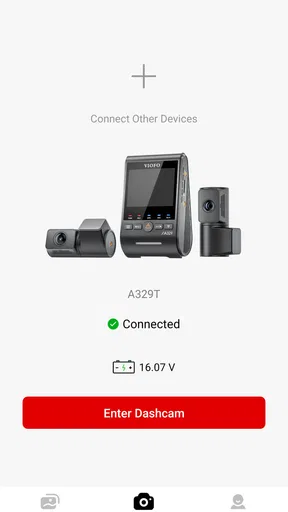
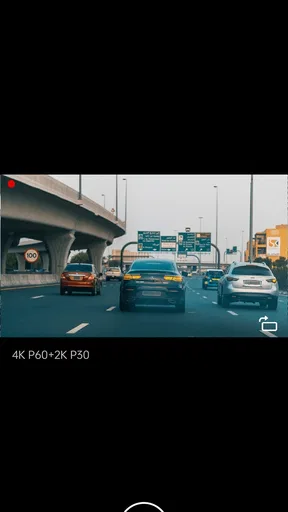
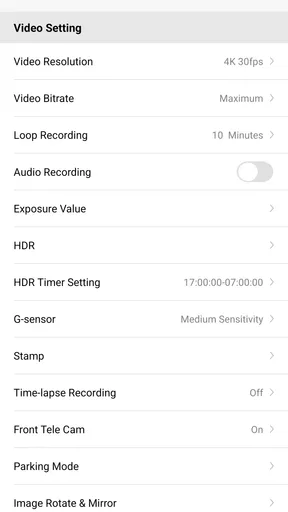
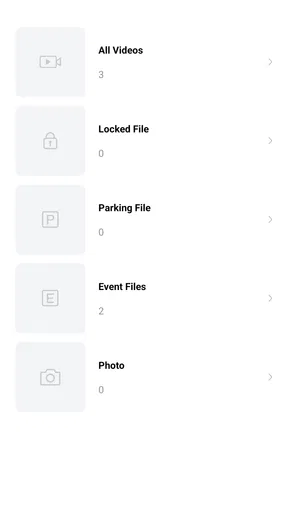
Our Review of VIOFO Dashcam
 Analysis by Appyee
I use a dash camera for one simple reason: when something unexpected happens on the road, I want the recording process to be as uncomplicated as possible. The VIOFO Dashcam app is built around that practical need. Developed by VIOFO Ltd, it connects with compatible VIOFO dash cameras so I can adjust camera settings and move saved videos or photos to my phone. It is a free Android app in the Auto & Vehicles category, aimed at drivers who want a more convenient way to manage footage than removing a memory card every time.
My first impression is that this is a companion tool rather than a complete driving app. It does not try to replace navigation, insurance services, or a general-purpose video editor. Its value depends heavily on whether I already use a VIOFO camera. If I do, the app can make routine camera management much easier. If I do not, there is little reason to install it simply because the name sounds useful.
The app is available to everyone by age rating, and its current version is 2.2.01. It requires Android 7.0 or later, which keeps it accessible to many older phones. With over ten thousand installs, it has a modest footprint compared with widely used driving utilities. Its average rating is 3.2 from around seventy ratings, while the store shows around twenty written reviews. I would read that rating as a sign to keep expectations realistic: the app may solve a specific problem well, but the experience is not likely to feel equally polished on every phone and camera combination.
How the app feels during everyday dashcam use
I find the app’s everyday value is less about watching footage on a phone and more about making one useful check before I need it: can I reach a recording and save it cleanly? I’d try that with an ordinary clip while parked, then note where the file lands and how much space it takes. That small rehearsal also gives me a sensible starting point for thinking about privacy and the choices I make with downloaded footage.
Speed expectations when connecting and browsing footage
The most important speed question here is not whether the app opens quickly; it is how efficiently it helps me reach a particular clip. A dashcam recording is usually useful because it captures a precise moment, such as a close call, a parking incident, or a scenic drive. The app’s purpose is to bridge the gap between that moment and the file I need to save. In a good workflow, I can connect to the camera, adjust a setting, locate the relevant recording, and transfer it without turning a short task into a long session.
I would use it while parked, not while driving. That sounds obvious, but it changes how I judge the app. A few extra steps are tolerable when I am sitting in the car after arriving somewhere. They become irritating if I am standing in a hurry, trying to preserve footage before the camera overwrites older files. The app is therefore best understood as a parking-lot or driveway utility, not something to operate on the move.
For regular use, I would create a repeatable routine. First, stop safely and keep the camera powered. Next, connect the phone to the dashcam in the way supported by the camera setup, then open the app and look for the recording before changing unrelated settings. Once I find the clip, I would transfer the original file before trimming or sharing it elsewhere. This approach reduces the chance of accidentally working with a preview or losing track of the source recording.
A useful but easily overlooked trade-off is phone storage. Downloading several long recordings can consume space quickly, especially if I save both front and rear camera material or keep duplicate copies. I would transfer only the relevant segment when possible, then move important files to a more permanent location. The app helps with getting footage onto the phone, but it does not remove the need for a sensible filing system.
What happens during heavier tasks
The heavier moments are likely to come when I browse many recordings, download large video files, or change several camera options during one visit. Those tasks place more demand on the phone, the camera connection, and available storage than simply opening the app. I would not judge the experience only by the first screen. The real test is whether the connection remains usable while I move through footage and whether a transfer can be completed without unnecessary repetition.
My advice is to avoid treating the app like a cloud library. It is more practical as a short-range control and download tool. If I need to review a large collection, I would first narrow the search using the camera’s recording organization, date, or event markers if those are available on my particular VIOFO model. I would then download only the files that matter. This saves time and avoids filling the phone with footage I will never watch.
There is also a difference between a useful transfer and a convenient share. A clip may need to be downloaded before I can send it through another app, and a large video can be awkward to handle on a mobile connection. For an insurance claim or a serious incident, I would keep the original file intact and avoid relying solely on a compressed social-media copy. The app is most valuable at the beginning of that process, when I need to get the camera’s recording into a place where I can inspect and preserve it.
One practical scenario shows where it fits well. Imagine I park after another driver cuts across my lane and I want to check whether the camera captured the event clearly. Instead of removing the memory card and finding a computer, I can use the phone as the first review point. I can identify the likely recording, download it, and keep a copy before continuing with the rest of the day. That is a meaningful convenience, even if the process still requires patience with the connection and file size.
Stability and recovery after interruptions
Reliability matters more than visual polish in a dashcam companion. A camera app can be forgiven for looking plain; it is much harder to forgive a failed transfer when the recording concerns an accident. I would therefore use it with a recovery mindset. If a download stops, I would first keep the camera powered, reconnect calmly, and check whether the original recording is still present before starting repeated transfers.
Phone interruptions are another reason to work deliberately. Incoming calls, switching between apps, a weak connection, or the phone moving out of range can interrupt a session. I would avoid beginning a transfer when I am about to leave the car, and I would confirm that the file appears in the phone’s storage before deleting anything from the camera. This is a simple habit, but it protects against the most frustrating kind of mistake: assuming a file was saved when it was only selected.
The app’s rating suggests that the experience may not be perfectly consistent for all users. I would not interpret that as proof of one specific fault, but it does make device and camera compatibility important. VIOFO has several dashcam models, and a companion app can feel different depending on the camera generation, phone hardware, Android version, and connection environment. Before depending on it for an important incident, I would perform a test transfer with an ordinary recording.
That test is one of my strongest recommendations. Record a short drive, connect the phone while parked, download the clip, close and reopen the app, and confirm that the saved file can be played. This checks the complete chain rather than only the connection screen. It also shows whether the phone has enough free space and whether the resulting file is easy to locate. A five-minute test can prevent a much more stressful first use after an incident.
Phone and operating-system constraints
The Android requirement is relatively accommodating because the app works from Android 7.0 onward. That does not guarantee identical behavior across every device, though. Older phones may have less free storage, slower file handling, or a less comfortable screen for reviewing detailed footage. Newer phones may handle large files more smoothly, but their connection behavior and background restrictions can still affect a transfer.
I would also think about the phone’s role. If it is my everyday phone, I may not want it occupied with multiple long recordings. If it is an older spare device kept in the vehicle, I would check storage and battery condition before relying on it. A spare phone can be convenient for dashcam management, but only if it can connect reliably and play the recordings without constant cleanup.
The app is free, which lowers the barrier to trying it with a compatible camera. Free does not mean frictionless, however. The real cost may be time spent connecting, selecting files, and organizing downloads. For someone who often needs to export footage, that time is worthwhile. For someone who rarely reviews recordings and is comfortable using a computer with a memory-card reader, the traditional method may remain simpler.
Privacy and safety also shape how I would use it. Dashcam footage can include faces, license plates, locations, and conversations depending on the camera setup. Once a clip is downloaded to the phone, it may be backed up or shared through other services according to the phone’s own settings. I would keep sensitive recordings private, rename them clearly, and share only what is necessary. The app’s job is access; responsible handling still belongs to me.
Where it beats the usual alternatives
The usual alternative is removing the memory card and using a computer or card reader. That method can be dependable, especially when I need to copy a large batch of recordings. It is also less dependent on a phone connection. The VIOFO app wins on convenience when I am away from a computer and need one specific clip quickly. Its strongest advantage is not advanced editing; it is reducing the distance between the dashcam and the phone.
Another alternative is using a camera with a broader cloud or automatic-sync system. That can be better for drivers who want remote access or a more hands-off archive. The VIOFO app is a more direct tool: I connect to the camera and choose what to download. That approach gives me control over which files leave the camera, but it also means I need to be present and involved.
Compared with a general file manager, the dedicated app should be more appropriate for camera settings and dashcam footage. A file manager may help after a card is mounted or a video is already on the phone, but it does not replace the camera-facing workflow. Conversely, if my main goal is editing, adding captions, cutting clips, or preparing polished videos, I would use a separate editor after downloading the original recording. Keeping those jobs separate is cleaner than expecting this app to do everything.
One non-obvious benefit is that a dedicated connection can encourage better maintenance. I am more likely to check settings, review whether the camera is recording as expected, and confirm that files can be retrieved when the process is convenient. That matters because a dashcam is only useful if I can access its footage when needed. The app does not make the camera infallible, but it can make routine checks less of a chore.
Who should use it and who should skip it
I would recommend it to owners of compatible VIOFO dashcams who want to adjust the camera and download selected videos or photos without reaching for a computer. It is particularly suitable for drivers who travel frequently, people who want to review a recording soon after a journey, and anyone who prefers keeping the memory card in the camera. It also makes sense for a new owner who wants to test the camera connection as part of the initial setup.
I would be more cautious if my priority is automatic backup, remote monitoring, or a polished media-management system. Those needs point toward a different kind of dashcam ecosystem. I would also skip it if I do not own a compatible VIOFO camera, because the app’s usefulness is tied to that hardware rather than to general driving assistance.
Users with limited phone storage should plan before downloading. I would reserve space, transfer only important clips, and avoid keeping several copies in different folders. If a recording may be evidence, I would preserve the original and make a separate copy for sharing or editing. That small distinction is important: convenience should not replace file integrity.
My performance verdict
After looking at the app as a working tool rather than a flashy mobile product, I see a focused companion with a clear purpose. It offers free access to VIOFO camera controls and footage downloads, supports Android 7.0 or later, and can make a specific everyday task much easier. The best experience comes when I am parked, have enough storage, know which recording I need, and have already tested the connection with my camera.
Its limitations are equally clear. It is not the right answer for cloud-first archiving, extensive video editing, or drivers who want a dashcam system that manages everything automatically. The modest install base and 3.2 average rating also make me favor a cautious setup rather than blind reliance. I would test transfers before an important journey and keep the memory card or another backup method in mind for critical footage.
My bottom line is simple: this app is most useful as a practical bridge between a VIOFO dashcam and an Android phone. It does not need to be a complete vehicle platform to earn its place. If I own compatible VIOFO hardware and regularly need quick access to recordings or camera settings, I would install it and build a short, careful workflow around it. If I want effortless remote backup or advanced media tools, I would choose a different solution instead.
Verdict
Strengths of VIOFO Dashcam
- Supports high-resolution recording for sharper license plate details.
- Compatible with many VIOFO dashcam models and accessories.
- Offers useful parking surveillance features on supported hardware.
- Video files can be organized and reviewed directly from the app.
- Firmware updates help keep compatible cameras current.
Limitations of VIOFO Dashcam
- Wi-Fi connection can be slow when transferring large video files.
- Some features require a compatible VIOFO camera and firmware version.
- The interface may feel dated compared with newer dashcam apps.
- Live preview can lag or disconnect in areas with wireless interference.
- Background use may drain the phone battery during extended sessions.
Similar Picks in This Category
View All
Android Auto
Google LLC4.1

maxim — order a taxi & food
PT. SITO4.7

Штрафы ГИБДД: проверка с фото
Pays LLC – Штрафы ГИБДД4.7

Номерограм – проверка авто
Авто Ассист4.8

Дром Авто
Дром4.9

Frequently Asked Questions
What is VIOFO Dashcam, and what can the app do?
VIOFO Dashcam is the companion app for compatible VIOFO car cameras. After connecting your phone to the dashcam’s Wi-Fi network, you can view the live camera feed, adjust recording and camera settings, browse saved videos and photos, and download important files to your device. It is especially useful for checking footage without removing the memory card from the dashcam.
Which VIOFO dashcams are compatible with the app?
Compatibility depends on the specific VIOFO dashcam model and its firmware version. Most newer VIOFO cameras with built-in Wi-Fi can connect to the application, while older or basic models may not support every feature. Before downloading, check the app listing and VIOFO’s official compatibility information for your exact model. Updating the camera firmware may also be necessary.
How do I connect the VIOFO Dashcam app to my camera?
First, turn on the dashcam’s Wi-Fi function and open the VIOFO Dashcam app on your phone. In your phone’s Wi-Fi settings, connect to the network created by the camera using the password shown in the camera menu or manual. Return to the app to access live view and files. Because the connection is usually local, mobile internet may temporarily disconnect.
Can I download and share dashcam videos using the app?
Yes. The app lets you browse recordings stored on the dashcam’s memory card and download selected videos or images to your smartphone. Once transferred, files can normally be viewed in the phone’s gallery and shared through messaging apps, email, or cloud storage. Download speed depends on the video resolution, file size, Wi-Fi connection, and your phone’s available storage.
Does VIOFO Dashcam record video by itself, or is the app required?
The dashcam can generally record independently after it has been installed and configured, so the app is not required for continuous recording. The application mainly provides convenient control, live viewing, playback, file downloads, and settings management. You should configure the camera, date, time, loop recording, and other options before driving, since the phone connection is not needed during normal operation.
